I found a workaround for the Duplicity fails to
start
issue where 'sudo deja-dup' would fail with the python stacktrace
mentioned in the launchpad ticket.
The ticket was not very useful, so I started looking at the various
files in the stacktrace and saw line from
/usr/lib/python3/dist-packages/duplicity/backends/giobackend.py was
within an "if u'DBUS_SESSION_BUS_ADDRESS' not in os.environ" block.
So I wondered what would happen if I let that environment variable pass
into the sudo environment. I tried 'sudo -E deja-dup' as per preserve
the environment. This didn't
result in a stacktrace, but it ended up running the backup as the normal
non-root user, probably because the preserved environment included the
USER and HOME variables along with the DBUS_SESSION_BUS_ADDRESS
variable.
Then I tried preserving just DBUS_SESSION_BUS_ADDRESS with
'sudo --preserve-env=DBUS_SESSION_BUS_ADDRESS deja-dup', it worked as
expected.
So the hint here is that when presented with a stacktrace don't be
afraid to "Use the Source, Jean Luc".
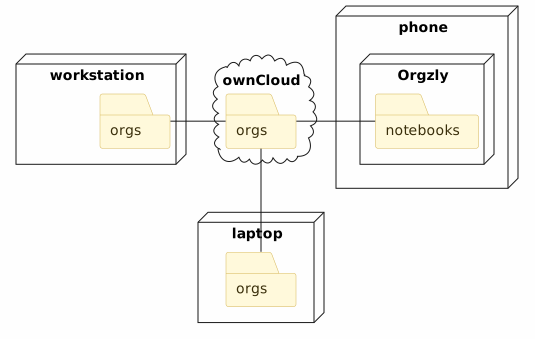
This post covers how I'm keeping my orgmode
notebooks synced between my desktop and phone. There are also some tips
on how I resolve merge conflicts in my notebooks and other hints for
using Orgzly.
Setup
Owncloud Server
Set up an owncloud server somewhere where both
my desktop and phone can reach it.
Desktop: Owncloud client and git repo
On the desktop, install the owncloud client and configured ~/owncloud
to be shared with the server. Also set up an ~/owncloud/org directory
and add an ~/org symlink that points to ~/owncloud/org. This is mostly
to make it easier to access the org files.
Update your emacs and/or vi configs to support orgmode. I'll update the
org files in the editor that's more convenient at the time, though
I'll use emacs if I need to update the deadline of a task.
I've also added .git to the owncloud and did a 'git init' in the
~/owncloud/org directory. This repo will be used in the 'Handling
Conflicts' section below.
Create or move your notebook files into the ~/owncloud/org directory
and make sure they have a '.org' extension. Verify that the org files
are being synced to the owncloud server.
Make sure your owncloud client is set to start when your desktop
reboots.
Phone: Owncloud client and Orgzly
Install the owncloud client on your phone.
Configure it to sync with the owncloud server and verify it's syncing
the notebook files from the server.
Also install and configure Orgzly. For the
syncing the repositories [use WebDAV]{.title-ref} with the URL
https://<your-owncloud-server>/remote.php/webdav/org. I originally
tried using local storage, but I couldn't get that to work.
Then for each of the notebooks, [set the link]{.title-ref} to
https://<your-owncloud-server>/remote.php/webdav/org. Update one of
your notebooks with Orgzly and verify the change is synced to your
desktop.
Day-to-day Usage
Throughout the day, I'm usually using Orgzly, checking the Agenda tab
for overdue and upcoming tasks, and adding new tasks and notes.
I'm access the Notebooks on the desktop less frequently, mostly
archiving completed tasks, and adding links and notes to research tasks.
I also tend to move tasks between notebooks from the desktop.
Handling Recurring Events
I ignore the scheduled time setting in Orgzly, and only set the
deadlines with warning times. Then I treat the notification that's
generated from warning time passing as the time I should start on a
task.
For repeating events, I use the '++' modifier for tasks. This way if I
miss a few iterations of a task it will add the next iteration in the
future.
I'm also try to set an appropriate warning period when setting tasks.
It took me a while to figure out I could tap on the date itself to bring
up a calender instead of being limited to the 'today', 'tomorrow',
and 'next week' options. <shrug>.
Handling Conflicts
Sometimes when I'm updating the notebooks on both my desktop and phone,
orgzly will say there's a conflict.
When this happens I go to my desktop and make a checkpoint commit of any
outstanding changes on the ~/owncloud/org repo. Then I push the
Notebook from Orgzly (the Cloud with the 'up' arrow.
Then on the desktop, I do a 'git diff' and adjust Notebook as needed.
Usually this includes adding some new notes or adjusting some deadlines.
I use GnuCash, but keeping my 401(k) accounts up to date has always been
a tedious, manual process.
I came up with the python snippet below to handle the import, but it was
a pain to write since I couldn't find any examples for setting up stock
or mutual fund transactions.
The
SetSharePriceAndAmount
method ended up being key, and I only found that by searching through
the gnucash source.
The GncNumeric class also ended up being more of a pain to use than I
expected. There's probably a better way to use it, but the 'multiple
values by 1000000/100000' approach is working for me now.
I'm using the stock GnuCash and python-gnucash version 2.6.19 available
in Ubuntu 18.04, so this stuck using python 2.7.
#!/usr/bin/python2.7importcsvfromdatetimeimportdatetimeimportgnucashsession=gnucash.Session("xml://yourfile.gnucash")book=session.bookroot_account=book.get_root_account()usd=book.get_table().lookup('ISO4217','USD')# There's probably a better way to use 'Your:Retirement:Contributions' instead ....contrib_acct=root_account.lookup_by_name("Your").lookup_by_name("Retirement").lookup_by_name("Contributions")parent_acct=root_account.lookup_by_name("401k")withopen('your_transactions.csv','rb')astrans_csv:trans_reader=csv.reader(trans_csv,delimiter=',')# Skip over the first row since it's headersheader=next(trans_reader)fordescription,date,fund_name,share_price_str,share_amount_str,amount_strintrans_reader:child_account=parent_acct.lookup_by_name(fund_name)posting_date=datetime.strptime(date,"%m/%d/%y")tx=gnucash.Transaction(book)tx.BeginEdit()tx.SetCurrency(usd)tx.SetDatePostedTS(posting_date)tx.SetDescription(description)sp1=gnucash.Split(book)sp1.SetParent(tx)sp1.SetAccount(child_account)# GncNumeric(n,d) represents numbers as fractions of the form n/d, so GncNumeric(1234567/1000000) = 1.234567# There's probably a better way to do this...share_price=gnucash.GncNumeric(float(share_price_str)*(10**6),10**6)share_amount=gnucash.GncNumeric(float(share_amount_str)*(10**6),10**6)# share_price * share_amount == amount, so I could have used that instead using the value from the csvamount=gnucash.GncNumeric(float(amount_str)*(10**6),10**6)# ( ˘▽˘)っ♨ This is the secret sauce for setting the number of shares and the price.sp1.SetSharePriceAndAmount(share_price,share_amount)sp2=gnucash.Split(book)sp2.SetParent(tx)sp2.SetAccount(contrib_acct)sp2.SetValue(amount.neg())tx.CommitEdit()session.save()session.end()
Special thanks to this
post
for providing most of the code above.
I'm at the point with a Elixir/Phoneix side project that I'm thinking
about deployment.
The first big stumbling block was that development environment (Ubuntu
16.04) wasn't the same as my deployment environment (Centos 7). For
Ubuntu, I could pull the latest Elixir packages from Erlang
Solutions,
but they don't host Centos Elixir packages, and the version of Elixir
on EPEL is over 4 years
old - old
enough that 'mix deps' on my project was erroring out.
I found the posts below about installing Elixir on Centos 7 but, they
involve cloning the Elixir repo and building it from source, but I
don't want development tools like git and gcc on my production
machines.
Maybe one of those links works for you, but what I
want is a way to build a
more recent version of the Elixir rpm than what was available in EPEL.
That way I can recompile and package Elixir on a development machine,
and then only copy the rpm up to my production machine.
It looks like Elixir in EPEL is waiting for the Erlang 18 release
to get promoted in EPEL, so maybe I can take the existing Elixir
packaging source and build it against the latest Erlang packages from
Erlang Solutions.
I found the packaging source at
https://src.fedoraproject.org/rpms/elixir and after poking around a
bit I came up with Vagrantfile below. It seems to be working OK so far.
:
At work there's a python coding convention that I tend to overlook a
lot. So when I post merge requests, there's a pretty good chance
someone's going to call me out on this, which leads to a followup
commit and another round of peer review. This can lead to an extra delay
of a few hours until I notice the comments, switch context back to that
merge request, making the changes, update the merge request and wait for
another round of reviews. If I could find a way to check my code for
this convention before posting the merge requsts, I could get my code
merged in a few hours faster.…
The Convention
The coding convention I cannot internalize is as follows: In python, the
format method for strings will call the __format__ method on its
arguments for you, so any code that looks like:
"interpolate these: {}{}".format(str(a),str(b))
Need only look like:
"interpolate me: {}{}".format(a,b)
The Pylint Plugin
So googling around led my to this Ned Batchelder
post
from a few years back. That post also led to a couple pylint plugins
here.
Looking at pylint's own format
checker
reminded me that I should also be handling keyword arguments.
From the post and sample code, it looked like I needed to define a
checker class with a visit_callfunc method that would check when the
'format' method was used, and then check all the arguments to the
format call and throw an error if any of them where a function call to
str().
To come up with this I used an embarassing amount of exploratory
programming to figure out
astroid. I wrote an initial visit_callfunc() method based on the
sample code that didn't do much more than dump out all the data about
the node argument via dir(node) and node.__dict__. Then I would call
pylint with the plugin against some sample source with the error I was
trying to plugin to report.
I run the plugin against the existing code and found one lingering case
where the reviewers had allowed one of my unneccessary str() call into
the codebase. It's been removed now.
Lessons Learned
pylint plugins are pretty powerful and I wouldn't shy away from
writing another one. I'm on the lookout for other excuses to write
another one.
I use Ubuntu (16.04 for now) and Vagrant (1.9.0 for now) on a bunch of
my projects, and I've been running into somethinng like this [power
management bug]{.title-ref} for a while now, where after restoring from
suspension, my vagrant sessions would be dead and I'd have to 'vagrant
halt' and 'vagrant up' before another 'vagrant ssh' would succeed.
To work around this, I came up with some /etc/pm/sleep.d scripts which
would save any running vagrant boxes when suspending the workstation and
then resume the VMs when resuming the workstation.
Now if I'm in a 'vagrant ssh' session and Ubuntu suspends/resumes,
instead of coming back to a frozen session, I'll see I've been
disconnected from the ssh session, and I can do another 'vagrant ssh'
without having to halt/re-up the VM. That's better than nothing, but
the next step here is to start using something like screen or tmux in my
vagrant sessions so I can restore right back to where I left off.
So why bother with two scripts when you could have 1 script with a
single case statement ? I wanted saving the running vagrant boxes to
happen when all the usual services and userspace infrastructure was
still running, so I wanted that script in the 00 -49 range from as per
the 'Sleep Hook Ordering Convention' portion of 'man 8 pm-action`.
However I don't restoration to happen until all the services restarted,
so I pushed to the end of the service handling hook range. I may want to
revisit this, and rename it to 75_vagrant.
Note in the resume script, the command is pushed into the background
since I didn't want want to wait for the VMs to be restored before
resuming Ubuntu. I'm usually checking email or the web for a bit before
going back to my VMs so I'm OK if that's ready immediately.
Here are some other lessons I learned from these scripts:
Here are some issues I ran into installing NixOS
and how I eventually got around them.
Setting up a static IP since DHCP wasn't available.
My VM was hosted in an oVirt cluster where DHCP wasn't
working/configured, so the installation CD booted without a network.
Here's how I manually configred a static IP:
I spent a lot of time messing with various partitioning schemes until I
stumbled across one that worked. I didn't need disk encryption, and I
didn't want to bother trying UEFI with
ovirt, so here's
what I ended up with.
A 20G disk split into /dev/sda1 and /dev/sda2
/dev/sda1 is a 400MB 'WIN VFAT32' partition (type 'b', not type
'4' !!)
/dev/sda2 is a LVM partition with the rest of the space
For the LVM, /dev/vg/swap is an 8G swap partition and /dev/vg/root
has the rest of the LVM parition
In retrospect, I think a lot of my partitioning pain may have been
caused by trying to have /dev/sda1 set as a BIOS Parition (type '4'),
since I suspect the BIOS partition has to be under 32M.
Also in retrospect, I see only 23M is actually used on the current /boot
parition, so maybe 400MB was way too much and I should have gone with
/dev/sda1 being 32M and type '4'. ¯\_(ツ)_/¯
I think I also ran into problems using fsck on the boot partition
instead of fsck.vfat.
When the boot partition wasn't working, grub would fall into rescue
mode and the various 'set prefix / set root / insmod' fixes like this
one
or this other
one
didn't work.
What did work here was booting the system with the install CD again,
mounting /mnt/boot manually and seeing that failed, or that /mnt/boot
contained gibberish after mounting, and then unmounting /mnt/boot and
using testdisk to fix the
partition type. Testdisk really saved the day.
Mounting the boot partition
Before running nixos-install, I had to also mount the boot partition
under /mnt/boot:
> mount /dev/vg/root /mnt
> mkdir -p /mnt/boot
> mount /dev/sda1 /mnt/boot
> nixos-install
Verify the /mnt/etc/nixos/hardware-configuration.nix device paths
When I was messing with the disk partitioning, I rebuilt the /dev/sda1
partition a couple times. Apparently when you do that, you get new UUID
for the device.
This meant the "/boot" file system in
/mnt/etc/nixos/hardware-configuration.nix was using a device path that
was no longer valid. I updated the file to point to the current /boot
device and reran 'nixos-install'.
It looks like nixos-install isn't verifying the device paths are valid,
since nixos-install ran OK with the invalid device paths.
Configuring a static IP in /mnt/etc/nixos/configuration.nix
Here's what I ended up adding to the configuration.nix file to set up
static IP:
Heat the garlic and onion until the onion is clear.
Add garlic, onion, and spices to the turkey.
Heat the rest of the veggies in a separate pan.
When the veggies are tender, add half of them to the ground turkey.
Put the otiher half in a blender and blend them into a sauce.
Add the veggie sauce to the ground turkey.
Adjust sauciness by adding a cup or 2 or water to the ground turkey.
Continue heating until you're convinced the turkey is finished
cooking.
Salt & pepper to taste.
I only blended half the veggies because the pan I was using was too
small to cook all the veggies at once, but it turned out really nice,
especially with some chipotle hot sauce.
I'm started occassional series about lessons I've learned after
finishing with a project. The kick-off article is about a
certmaster fork I've been
working on. I've been using certmaster at $work for a few years now,
but when we wanted to start using multiple certificate authorities, we
had to spin up different instances of certmaster, with each instance
using on its own IP/port. It would be better if a single instance of
certmaster could serve multiple CA's by adding a '--ca' flag. This
is the functionality that my fork of
certmaster provides,
and here are the lessons I learned while working on this:
bats versus shunit2
certmaster doesn't include any tests, so I wanted to write some
functional tests to verify my changes worked as expected.
I started out working with [bats_]{.title-ref}, but it fell down when I
needed to push a command into the background - it just wouldn't do it.
I tried the 'gotcha' suggestions from this engine yard
post but
to no avail. I switched the tests to
shunit2 and had no trouble pushing
commands into the background.
Assigning here documents to variables
variable=$(cat <<EOF
this text will get assigned to variable.
EOF
I've found using Lua macros in rpm spec files to be pretty useful. I
haven't found many examples of their use online, so here's how I ended
up using them.
I had a situation where I needed to make a subpackage from all the files
in a number of different subdirectories. The structure of the files in
the subdirectories was fixed, but the number of subdirectories could
change over time, and I didn't want to have to update the spec file
each time a new subdirectory was added or removed.